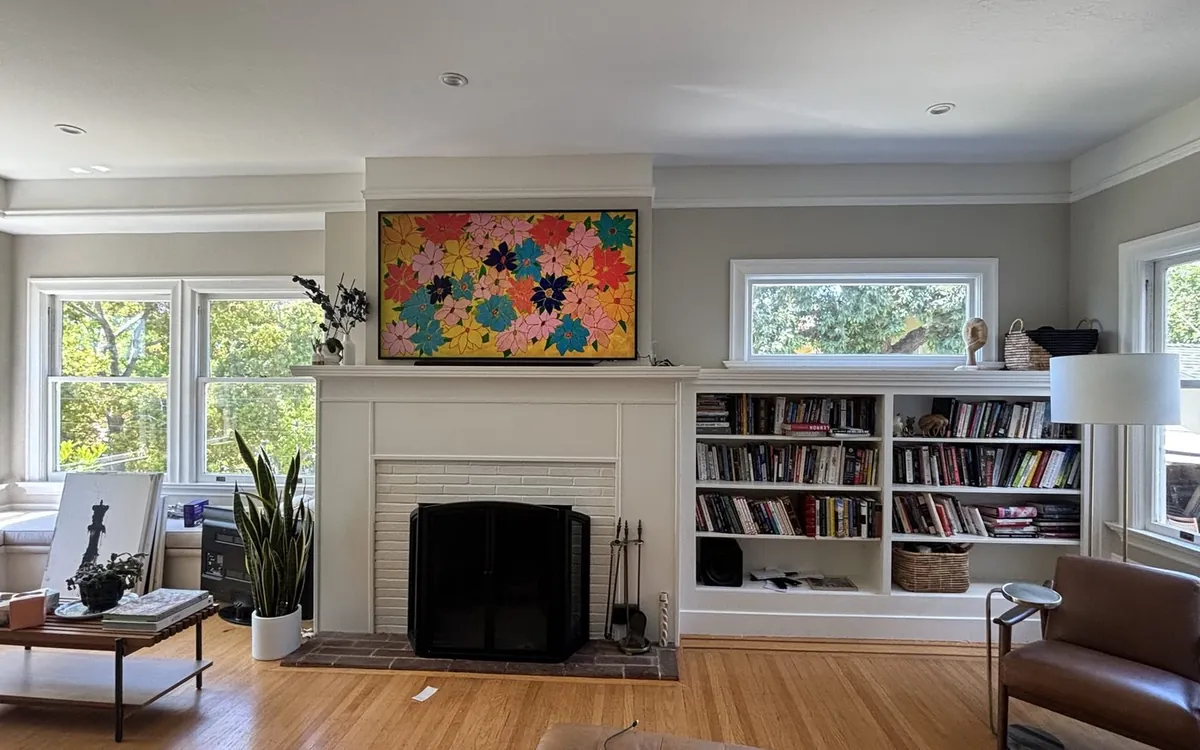
The Samsung Frame TV is not like other televisions. When it is on, it is a stunning 4K display. When it is off, it transforms into a piece of wall art that blends seamlessly into your home. But that seamless, flush-against-the-wall aesthetic that makes The Frame special? It only works when the installation is done right.
We install Samsung Frame TVs multiple times every week across Southern California. The most common call we get is from someone who tried mounting it themselves, and now their $1,500–$3,500 TV has a visible gap from the wall, dangling cables, or Art Mode that looks like a glowing rectangle instead of a painting. This guide covers everything you need to know about Samsung Frame TV installation—what it costs, what is involved, and why this particular TV benefits from professional mounting more than any other.
Samsung Frame TV Installation Cost
Samsung Frame TV installation costs more than mounting a standard TV because it requires more precision and additional steps. Here is what to expect in 2026:
| Frame TV Size | Installation Cost | With Cord Concealment |
|---|---|---|
| 32"–50" | $149–$179 | $224–$329 |
| 55"–65" | $179–$229 | $254–$379 |
| 75"–85" | $229–$299 | $304–$449 |
These prices include mounting the TV with the No-Gap wall mount, connecting the One Connect box, basic cable management, WiFi connection, and Art Mode configuration. In-wall cord concealment (hiding all wires inside the wall) is the additional cost shown in the right column—and we strongly recommend it for The Frame. Visible cables completely undermine the art-display aesthetic that makes this TV worth its premium price.
What Is Included in Professional Samsung Frame Installation
A proper Samsung Frame TV installation is more than just hanging a TV on the wall. Here is everything that should be included:
- No-Gap Wall Mount installation – Samsung's proprietary mount that makes The Frame sit flush against the wall with virtually zero gap, creating the picture-frame look.
- One Connect Box setup – Positioning and connecting the external box that houses all TV inputs (HDMI, USB, antenna, ethernet).
- One Connect cable routing – The thin, nearly invisible cable from the box to the TV needs to be routed cleanly, ideally through the wall.
- Cord concealment planning – Determining the best route for the power cord and One Connect cable based on your wall layout, outlet locations, and furniture placement.
- WiFi connection – Connecting The Frame to your home network for streaming and Art Store access.
- Art Mode setup – Configuring motion sensor sensitivity, brightness auto-matching, and walking you through the Art Store and SmartThings app.
- Display calibration – Adjusting brightness and color settings so Art Mode pieces look like physical artwork, not a glowing screen.
Size and Mount Requirements
Samsung currently offers The Frame in six sizes. Here are the specs that matter for installation:
| Size | Weight (approx.) | VESA Pattern | Recommended Mount |
|---|---|---|---|
| 32" | 13 lbs | 200x200mm | Samsung Slim Fit / No-Gap |
| 43" | 20 lbs | 200x200mm | Samsung No-Gap WMN-A50E |
| 50" | 25 lbs | 200x200mm | Samsung No-Gap WMN-A50E |
| 55" | 33 lbs | 200x200mm | Samsung No-Gap WMN-A50E |
| 65" | 40 lbs | 300x300mm | Samsung No-Gap WMN-A50E |
| 75" | 55 lbs | 400x300mm | Samsung No-Gap WMN-A50E |
| 85" | 72 lbs | 600x400mm | Samsung No-Gap WMN-A50E |
Even though The Frame TVs are relatively light compared to standard TVs of the same size, the installation demands are higher. The No-Gap mount has very specific stud alignment requirements, and because the TV needs to sit perfectly flat, there is zero tolerance for the mount being even slightly off-level or off-plane.
The No-Gap Wall Mount: Why It Matters
Samsung's No-Gap wall mount is specifically engineered for The Frame. Here is why it is not just a marketing gimmick:
What it does: The No-Gap mount uses a rail system that lets the TV hang flush against the wall with less than 5mm of gap. Standard TV mounts leave 1–3 inches of space between the TV and wall. That gap is fine for a regular TV, but it completely ruins The Frame's picture-frame illusion.
Installation nuances: The No-Gap mount requires the wall plate to be mounted perfectly level and at the exact right height. Unlike standard mounts where you have adjustment room, the No-Gap mount provides minimal adjustment after installation. If the plate is slightly off-level, the TV will hang crooked with no way to correct it. This is why professional installers use laser levels, not bubble levels.
Can you use a third-party mount? Technically yes—The Frame has standard VESA mounting holes. But any standard mount will leave a visible gap, and the One Connect cable routing becomes messier. We have seen customers buy The Frame specifically for its art-display look, then use a $15 Amazon mount that leaves a 2-inch gap. At that point, you have an expensive TV that looks like any other mounted TV.
The One Connect Box: The Hidden Challenge
The One Connect box is Samsung's clever solution to keeping The Frame thin. Instead of cramming all the input ports into the TV itself, Samsung puts them in a separate box that connects to the TV via a single thin cable. This keeps the TV slim enough to look like a picture frame.
What the One Connect Box Contains
- All HDMI inputs (typically 4 ports)
- USB ports
- Antenna/cable input
- Ethernet port
- Power supply (the TV's power cord plugs into the box, not the TV)
Where to Hide It
The whole point of the One Connect system is that the box should be invisible. Here are the most common placement options, ranked by how clean they look:
- Behind the wall – The cleanest option. We cut an access panel in the drywall behind or below the TV, place the One Connect box inside the wall cavity, and install a ventilated cover. Only works if the wall cavity is deep enough and there is no insulation or obstruction.
- Inside a media cabinet or shelf – If you have furniture below the TV, the box sits inside a cabinet or on a shelf. The One Connect cable runs down the wall (ideally through the wall) to the furniture.
- Behind the TV on the mount – Some No-Gap mount installations allow the box to sit on a small shelf bracket behind the TV. Works for smaller Frame models but gets tight with larger sizes.
- In an adjacent closet or room – For the ultimate clean look, the box can be placed in a nearby closet. The One Connect cable is long enough (about 16 feet) for most setups. We route it through the wall to the closet.
Ventilation Considerations
The One Connect box generates heat during use. If you are hiding it in an enclosed space, it needs adequate airflow to prevent overheating. We never seal a One Connect box in a completely closed wall cavity without ventilation. A simple louvered cover plate or mesh panel provides enough airflow while keeping the box hidden.
Cord Concealment Options for Samsung Frame TV
This is where Samsung Frame TV installation gets more involved than regular TV mounting. The Frame has two cables to deal with: the power cord and the One Connect cable. Here are your concealment options:
In-Wall Kit (Best Option)
We cut two openings in the drywall—one behind the TV and one behind the furniture or near an outlet below. The One Connect cable and a code-compliant power extension route through the wall cavity. Result: zero visible cables. Cost: $75–$150 on top of mounting. This is what we recommend for every Frame installation.
Surface Raceway
A paintable plastic channel runs from the TV down the wall to the outlet area. It is not invisible, but when painted to match your wall color, it is subtle. Good option for concrete walls, brick walls, or rental properties where cutting into the wall is not allowed. Cost: $35–$65.
Samsung's One Invisible Connection
Newer Frame models use Samsung's One Invisible Connection cable, which is extremely thin and nearly transparent. On a white wall, this cable is almost invisible even without concealment. However, the power cord is still a standard cable that needs to be hidden. The One Invisible Connection cable helps but does not eliminate the need for cord management entirely.
Common Samsung Frame TV Installation Mistakes
After fixing hundreds of Frame TV installations done by other services or DIY attempts, here are the mistakes we see repeatedly:
1. Not Using the No-Gap Mount
The most common mistake. Someone mounts a $2,000 Samsung Frame TV on a $20 standard mount, and it sticks out 2 inches from the wall. Art Mode looks like a screen, not artwork. The TV's entire value proposition is wasted. The No-Gap mount costs $50–$100—do not skip it.
2. Visible Cables
The second most common issue. The Frame TV is hanging on the wall beautifully, but there is a power cord and HDMI cable dangling below it. This is especially noticeable because The Frame's design draws attention to the wall area around it. Invest in cord concealment.
3. TV Not Perfectly Level
On a regular TV, being a degree or two off-level is barely noticeable. On The Frame, when it is displaying a framed piece of artwork, even a half-degree tilt is immediately obvious—your brain instinctively notices a crooked picture frame. Professional installers use laser levels to ensure perfection.
4. Art Mode Not Configured Properly
Many installations leave Art Mode in its default settings, which means the screen is too bright and the motion sensor is not calibrated. A properly configured Frame TV adjusts its brightness to match ambient room lighting, making artwork look natural. Without calibration, artwork looks like a bright screen displaying an image—not like a painting.
5. One Connect Box Left Visible
The One Connect box sitting on the floor or on top of a media console with a cable running up the wall is a wasted opportunity. The whole point of the external box design is that it can be hidden. Take the time to conceal it properly.
6. Wrong Height
The Frame TV should be positioned where a piece of artwork would naturally hang—typically with the center at 57–60 inches from the floor (gallery height). Many people mount it at standard TV height (42–48 inches center) which works fine for watching but looks odd when the TV is in Art Mode displaying a painting that is too low on the wall.
Samsung Frame vs Regular TV Mounting: What Is Different?
| Factor | Regular TV | Samsung Frame TV |
|---|---|---|
| Mount Type | Fixed, tilt, or full-motion | No-Gap mount required for flush look |
| Wall Gap | 1–3 inches (normal) | Under 5mm (essential for art effect) |
| Cable Count | Power + HDMI cables | Power + One Connect cable + routing |
| External Box | None | One Connect box needs hiding |
| Level Precision | Within 1 degree is fine | Laser-level precision required |
| Post-Mount Setup | Plug in and done | WiFi, Art Mode, calibration, app setup |
| Typical Time | 30–45 minutes | 60–90 minutes |
| Cost (55–65") | $119–$179 | $179–$229 |
The cost premium for Samsung Frame installation ($40–$80 more than a standard TV of the same size) covers the additional precision, One Connect box handling, and Art Mode configuration time. Considering The Frame costs $500–$1,500 more than a comparable standard TV, investing an extra $40–$80 in installation to make it look right is a smart decision.
Book Your Samsung Frame TV Installation
We install Samsung Frame TVs daily. No-Gap mount precision, One Connect box concealment, Art Mode calibration, and cord concealment—the full treatment your Frame deserves.
Book Frame Installation → See All PricingFrequently Asked Questions
How much does Samsung Frame TV installation cost?
Samsung Frame TV installation costs $149–$299 depending on TV size. A 55–65 inch model runs $179–$229 for professional mounting with the No-Gap mount. Add $75–$150 for in-wall cord concealment to get the completely wire-free art gallery look.
Can I mount a Samsung Frame TV myself?
You can, but Samsung Frame TVs are significantly harder to mount well compared to standard TVs. The No-Gap mount requires laser-level precision, the One Connect box needs a concealment plan, and Art Mode calibration requires specific settings knowledge. Most DIY installations we have seen compromise the art-display aesthetic that justifies The Frame's premium price.
Do I need the Samsung No-Gap wall mount?
If you want The Frame to look like a picture frame (which is the entire point), yes. The No-Gap mount makes the TV sit flush against the wall with virtually zero gap. Standard mounts leave 1–3 inches of space, making The Frame look like any other mounted TV. The No-Gap mount costs $50–$100 and is absolutely worth it.
What is the Samsung One Connect box and where should it go?
The One Connect box is the external component that houses all the TV's input ports (HDMI, USB, antenna, power). It connects to The Frame via a single thin cable. It should be hidden behind furniture, inside a wall cavity, or in an adjacent closet. It needs ventilation and power access.
How do you hide the cords on a Samsung Frame TV?
The best method is in-wall routing: the One Connect cable and a code-compliant power solution route through the wall cavity, emerging behind furniture or near a hidden outlet. This creates a completely wire-free appearance. Surface raceways are the budget alternative for walls where cutting is not possible.
Does installation include Art Mode setup?
With Zomg The Handyman, yes. We connect your Frame to WiFi, configure Art Mode settings (motion sensor sensitivity, brightness matching), walk you through the SmartThings app, and calibrate the display so artwork looks like physical paintings rather than a glowing screen.
Related guides: TV Mounting Cost Guide 2026 · Full Pricing Page · TV Mounting in Los Angeles · TV Mounting in Beverly Hills · All Services
Want a pro to handle the TV Mounting?
TV Mounting pros across California. Fastest exact price: send a quote request with photos.
Popular areas: Los Angeles · Riverside · Long Beach · see all cities